How to Add Fobs to a Simpled Lock
Compatible RFID types and how to program proxy fobs, cards, and phone tag stickers
Original HubSpot URL: https://learn.simpled.uk/how-to-add-fobs-to-a-simpled-lock
Compatible RFID Cards and Fobs
Simpled locks use MIFARE RFID technology operating at 13.56 MHz.
Compatible credentials include:
RFID Cards
Proxy Fobs
Phone Tag Stickers
All credentials must use MIFARE 13.56 MHz RFID to work with the lock.
Other RFID frequencies will not be recognised.
Before You Start
Before a card, fob, or sticker can unlock the door, it must be programmed into the lock using the app.
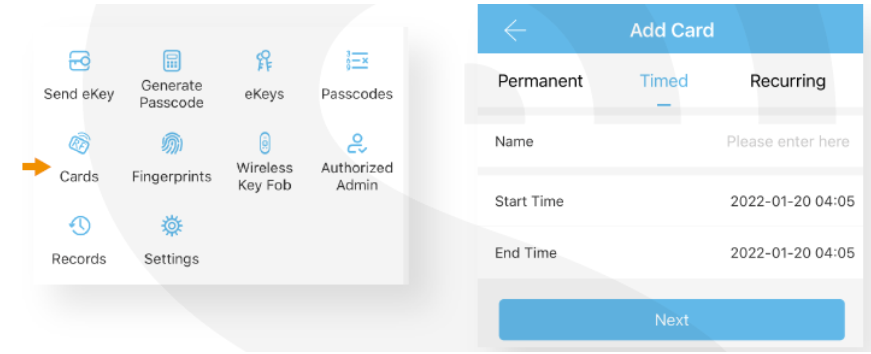
When adding a credential, you can choose whether it should be:
Permanent – access available at all times
Time-limited – access only within a defined schedule
How to Add a Fob or RFID Card
Open the smart lock app
Select the lock
Go to Cards
Tap Add
When prompted, hold the RFID card, fob, or sticker near the lock reader
Wait for confirmation that the credential has been added
Once programmed, the credential can be used to unlock the door.
Testing the Fob
After programming:
Hold the fob or card near the lock reader
The lock should recognise the credential
The door should unlock