Leverline Handle — How to Change the Batteries
A simple step-by-step guide to replacing the batteries in your Leverline smart handle
Original HubSpot URL: https://learn.simpled.uk/leverline-handle-how-to-change-the-batteries
What you’ll need
The 2.5 mm Allen key (hex spanner) supplied with your lock
Replacement batteries (correct type as specified in the manual)
Step-by-step instructions
Locate the Allen key
Find the 2.5 mm Allen key included in the screw bag supplied with your lock.Undo the fixing bolt
Insert the Allen key into the bolt hole on the reverse side of the inside handle and loosen the bolt.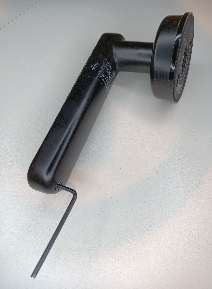
Remove the battery cover
Once the bolt is loose, carefully remove the battery cover.Replace the batteries
Insert the new batteries, ensuring the polarity (+/–) matches the markings.Refit the cover
Place the battery cover back on and tighten the bolt securely using the Allen key.
Done!
Your Leverline lock should now be powered and ready to use.