OA-SP Keypad Installation & Battery Replacement Guide
**Battery setup, reset, and keypad installation guide **
Original HubSpot URL: https://learn.simpled.uk/oa-sp-keypad-installation-battery-replacement-guide
The OA-SP keypad combines:
Keypad entry
Fingerprint sensor
Fob / Tag / Card reader
It connects to your lock as a Bluetooth remote control.
This guide shows you how to:
Open the keypad
Reset (initialize) it correctly
Insert the batteris
Install it securely on the wall
⚠️ Follow each step exactly. Missing steps will prevent the device from working.
Step 1: Open the Keypad Panel
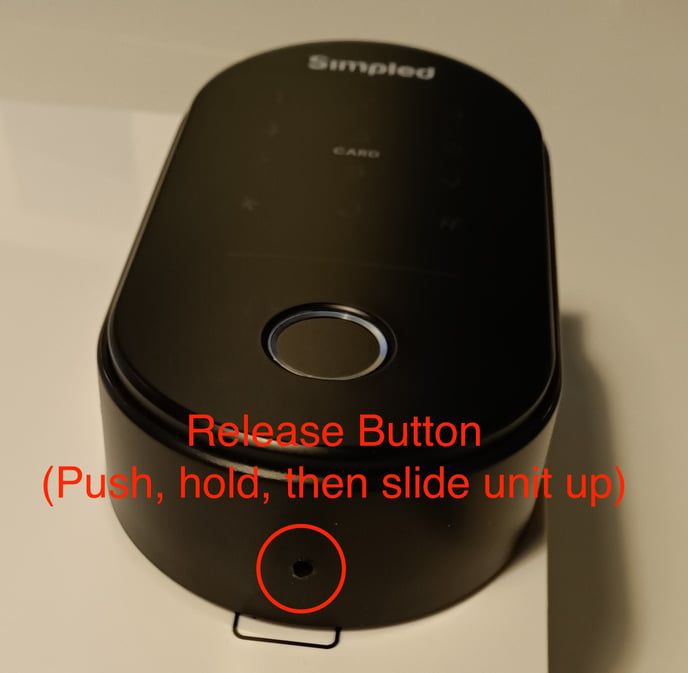
Locate the release button at the base of the keypad
Press the button (it is slightly recessed)
At the same time, slide the panel out
Step 2: Reset / Initialize the Device
⚠️ This step is required before setup
Follow carefully:
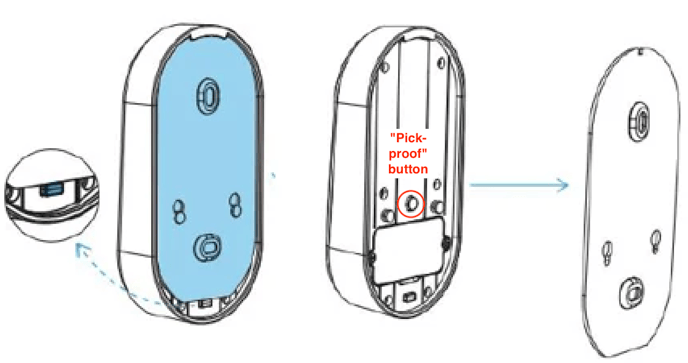
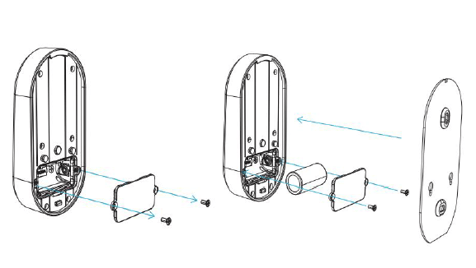
Loosen and remove the battery cover screws
Remove the battery cover
Locate the tamper (“pick-proof”) button above the battery compartment
Reset process and battery insert:
Press and hold down the tamper button
While holding the button, insert the battery
Keep holding the button
Listen for sounds:
Continue to hold the button down for 5 seconds after you put the battery in, until you hear the first beep, then two beeps
Straight after the two beeps, release the button
✅ Initialization is now complete
Replace the battery cover
Tighten the screws securely
Step 3: Attach the Keypad to the Wall Plate
Align the two studs on the keypad with the larger openings on the mounting plate
Insert the studs into position
Slide the keypad upwards
✅ You will feel it click into place when secured
Important Notes
The reset step must be done correctly or the keypad will not function
Always wait for both beeps before releasing the button
Ensure the panel is fully clicked into place after installation
Still Not Working?
If the keypad does not respond:
Repeat the reset process carefully
Check battery orientation and charge
Ensure the panel is fully installed
If the issue continues, contact support with a short video of the setup process for faster assistance