Step-by-Step Guide for Using the Simpled WiFi Bridge (5G-SP)
The Simpled 5G-SP WiFi Bridge enhances your smart home system by enabling remote access to your smart lock via WiFi. This guide provides detailed instructions for installation, pairing, and troubleshooting.
Original HubSpot URL: https://learn.simpled.uk/step-by-step-guide-for-using-the-simpled-wifi-bridge-5g-sp
Specifications
Model: 5G-SP
Dimensions: 75mm x 75mm x 24mm
Network: WiFi 2.4G/5GHz
IEEE Standard: 802.11b/g/n/ac/ax
Power Interface: Type-C USB
Power Input: 5V / 500mA

Screenshot 2025-01-06 at 16.41.13
Light Status Indicators
Flashing Red/Blue: Standby Mode (Ready to Pair)
Blue Light: Normal Mode (Connected to Network)
Red Light: Network Failure

Pairing the Gateway with the App
Steps to Connect:
Prepare the App:
Open the Simpled app on your smartphone.
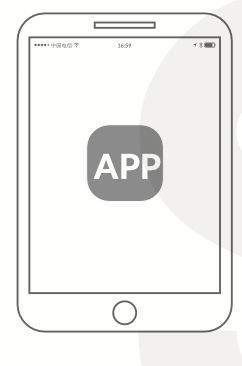
Screenshot 2025-01-06 at 16.46.12
≡ icon in the top left corner of the screen.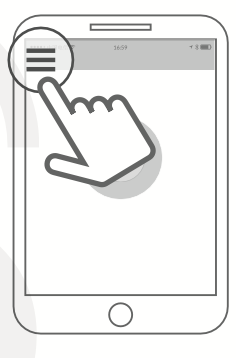
Screenshot 2025-01-06 at 16.46.21
Select Gateway, then choose G2.

Power On the Gateway:
Plug the gateway into a power source using the Type-C USB cable.
Ensure the light on the gateway flashes red and blue alternately (standby mode).
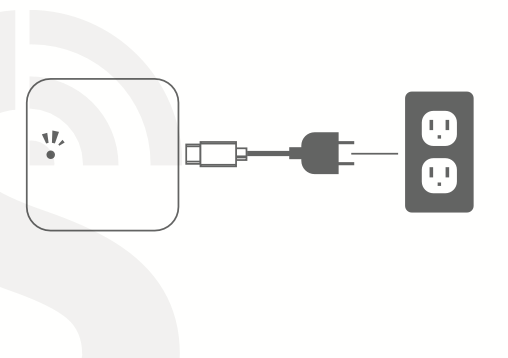
Screenshot 2025-01-06 at 16.50.03
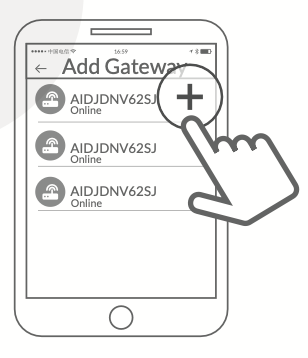
Initiate Pairing:
In the app, tap the
+icon to add a new device.Select your WiFi network and input your WiFi password.
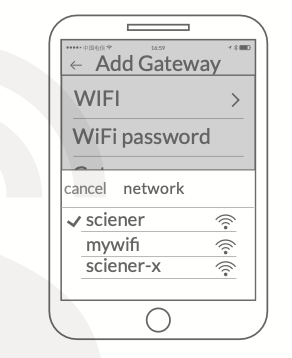
Screenshot 2025-01-06 at 16.52.16
Screenshot 2025-01-06 at 16.50.33
Complete the Process:
Follow the prompts in the app to finalize the connection.
Once the gateway is paired, the light will turn blue (normal mode).
Note:
If the pairing process times out:
Power off the gateway.
Restart the process from Step 2.
Warranty and Regulatory Compliance
Limited Warranty
The manufacturer provides a limited warranty covering defects in materials and workmanship for the original purchaser. The warranty terms are as follows:
Return or replacement requests may be made within 7 days of the invoice date.
Product replacement may be requested within 15 days of the invoice date.
Free repair services are available for up to 365 days from the invoice date.
This warranty does not cover defects resulting from product modification, alteration, misuse, improper handling, or physical damage caused by the user.
FCC Compliance Statement
This device complies with Part 15 of the Federal Communications Commission (FCC) Rules. Operation is subject to the following conditions:
The device may not cause harmful interference.
The device must accept any interference received, including interference that may cause undesired operation.
The equipment has been tested and found to comply with the limits for a Class B digital device. These limits are designed to provide reasonable protection against harmful interference in residential environments. Since the device generates and uses radio-frequency energy, improper installation or operation may result in interference with radio or television communications.
If interference occurs, users are advised to:
Reorient or relocate the receiving antenna.
Increase the distance between the device and the receiver.
Connect the device to a different electrical circuit.
Consult a qualified radio or television technician.
Any modifications not expressly approved by the manufacturer may void the user's authority to operate the equipment.
RF Exposure Requirements
The device has been evaluated in accordance with FCC radio-frequency exposure guidelines. To maintain compliance, a minimum separation distance of 20 cm must be maintained between the device's transmitter and the user's body during operation.
Support:
Email: [email protected]
Visit: Simpled Support
Useful Information:
The Benefits of a Wi-Fi Bridge
Using one Wi-Fi Bridge for multiple smart locks
Sharing code remotely anywhere in the world
Setting the Gateway to a new network