Wireless Keypad – Pairing and Battery Replacement
How to pair the Simpled Wireless Keypad and replace the batteries
Original HubSpot URL: https://learn.simpled.uk/wireless-keypad-pairing-and-battery-replacement
Pairing the Keypad
Activate Pairing Mode
If the keypad is new:
Press any key on the keypad
The green light will flicker
The keypad is now in pairing mode
If the keypad has been paired previously:
Enter: 529#
The green light will flicker
The keypad has re-entered pairing mode
Once pairing mode is active, complete the pairing process in your app.
Changing the Keypad Battery
Follow the instructions shown in the product images here:
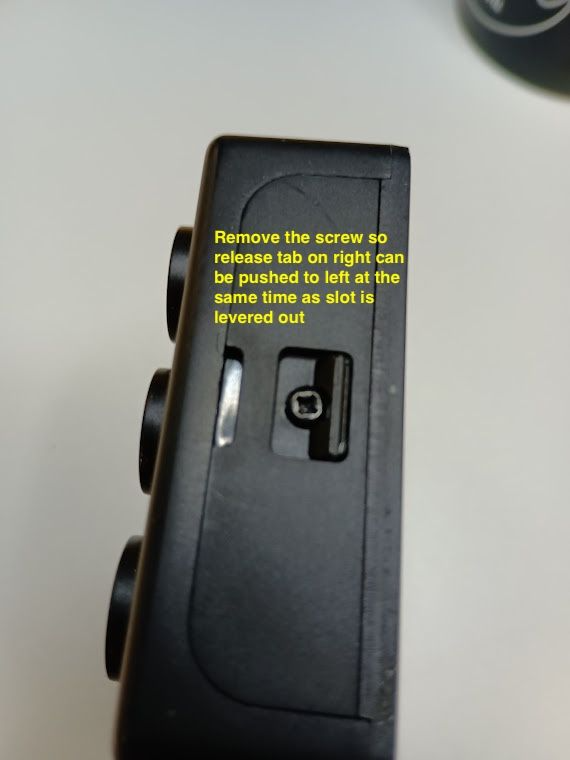
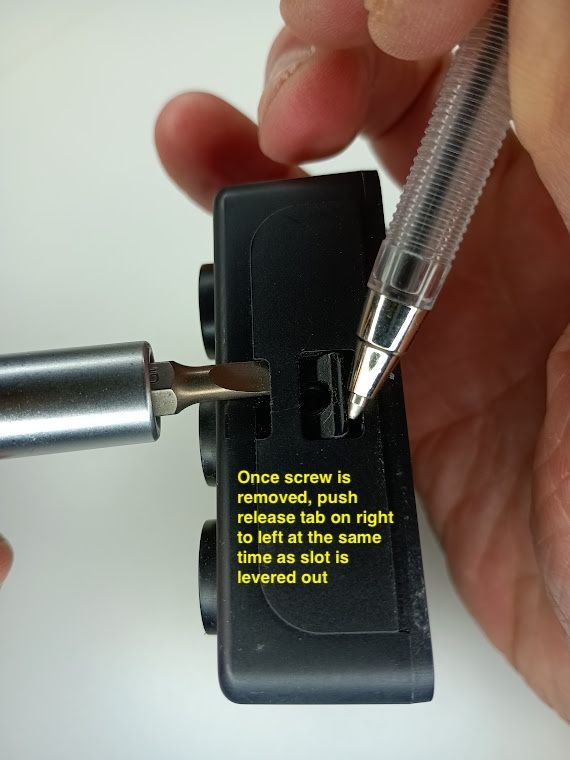
Follow the steps carefully to avoid damaging the casing.
Step 1 – Remove the Fixing Screw
Locate and remove the screw securing the keypad cover.
Step 2 – Release the Cover
Once the screw has been removed:
Push the release tab on the right-hand side toward the left
At the same time, gently lever the slot outward to release the cover
Please don't use excessive force.
Step 3 – Replace the Batteries
Remove the old batteries
Reinsert and tighten the screw
Weather Protection Notice
The Simpled Wireless Keypad is not certified as weatherproof.
If installed outdoors, additional protection is recommended.
Third-party keypad rain covers are widely available and can be purchased from retailers such as Amazon.